Appearance
Stock on hand and value
This report shows the stock of every variant now, with its value: on hand × the variant's cost. The cost is the one typed on the variant, not what you paid on each purchase, so this is a value at standard cost. Reserved stock is still in the shop, so it counts in the value.
Who can do this: Anyone whose role has the Financial reports permission.
Step by step
Go to Reports › Stock on hand & value. It's always as of now, so there's no period.
Choose a shop, or keep All shops.
Read the tiles: the total Stock value, the value of each shop with its share, and how many products are Out of stock.
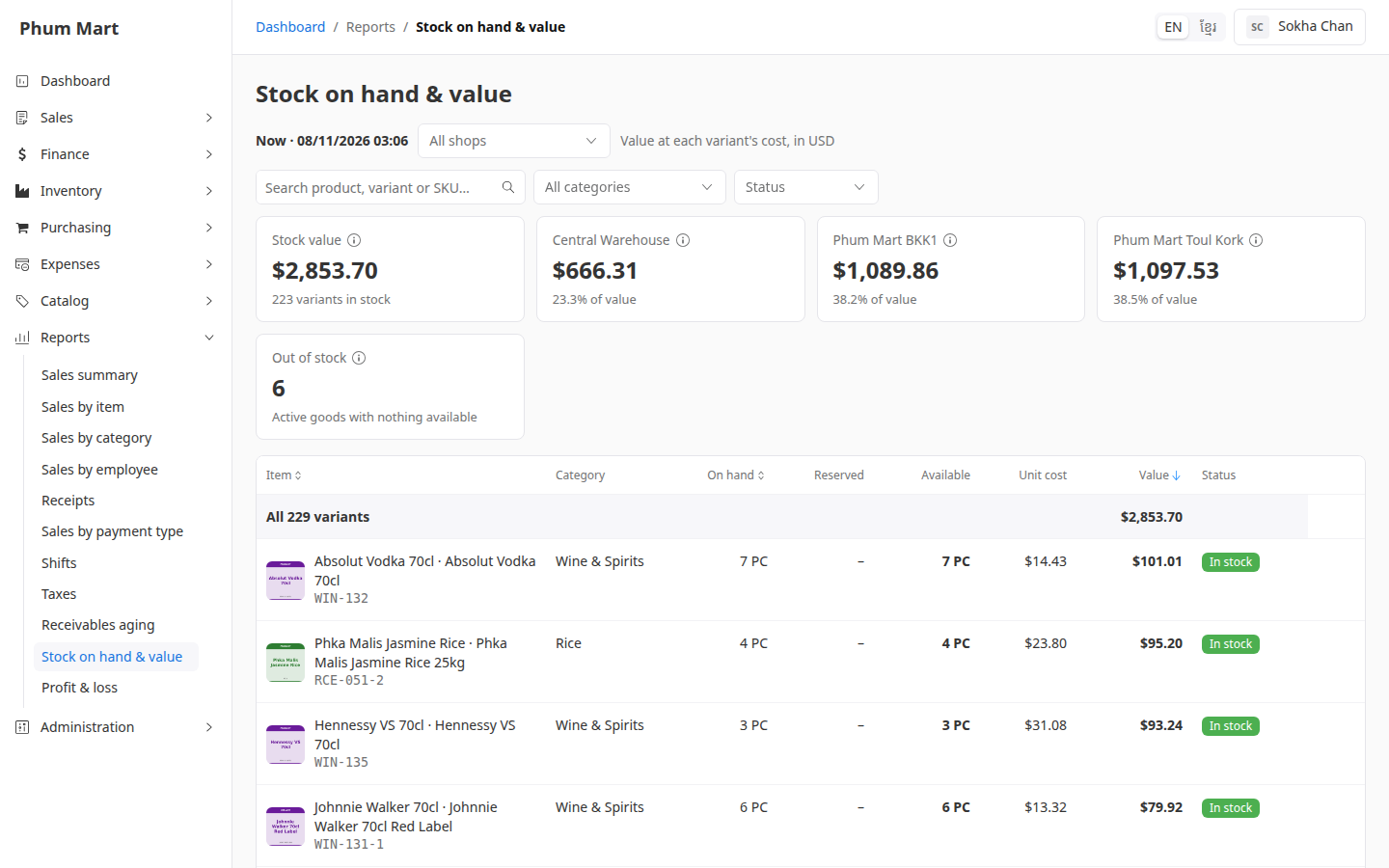
Read the table: each variant with its On hand, Reserved, Available, Unit cost and Value, highest value first. Sort by Item, On hand or Value with the column headers.
To find a product, search by name or SKU, or choose a category. Choose a Status, such as Out of stock or Not costed, to see only those.
Click a row to open the product.
Having trouble?
- A warning says some variants have no cost: their stock isn't in the value. Add their Cost. See Add product variants.
- The value doesn't match what you paid: it uses each variant's cost as typed today. Update the costs when your buying prices change.