Appearance
Receivables aging
This report shows what customers still owe today, on their unpaid and partly paid invoices, with VAT. Each amount is put in a bucket by how many days it's past its due date: Current (not due yet), 1–30 days, 31–60 days, 61–90 days and Over 90 days. An invoice with no due date is due on its issue date.
Each currency is shown on its own: choose it at the top.
Who can do this: Anyone whose role has the Financial reports permission.
Step by step
Go to Reports › Receivables aging. It's always as of today, so there's no period.
Check the currency, for example USD, and choose a shop if you want.
Read the tiles: Outstanding, Overdue, Over 60 days and Not due yet, and the bar of amounts by age.
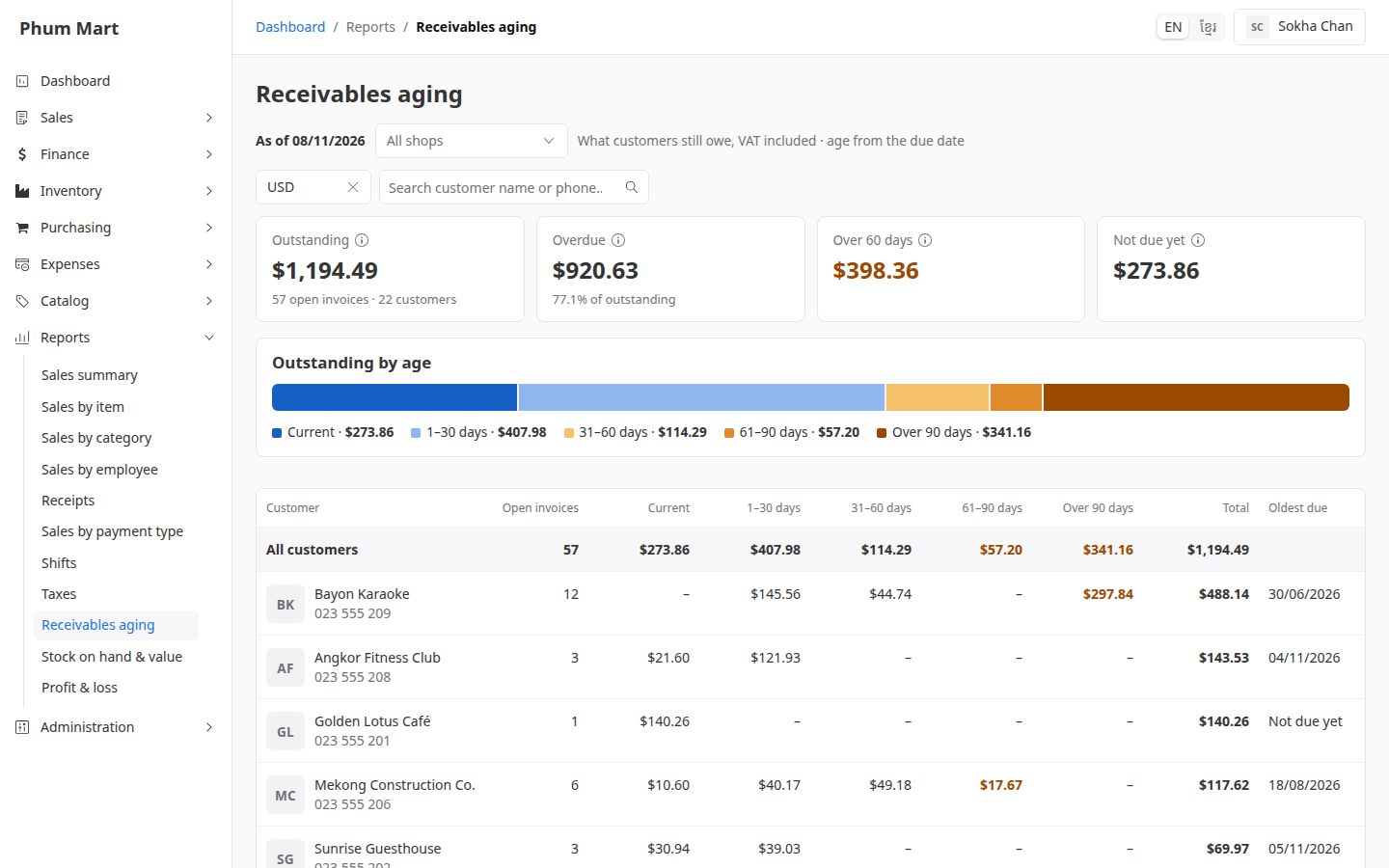
Read the table: one row per customer, who owes most first, with their amounts by age and their Oldest due date. Amounts over 60 days are in amber.
To search for a customer, type their name or phone.
Click a customer to open their unpaid invoices.
Having trouble?
- A customer is missing: they owe nothing in the chosen currency. Choose the other currency.
- An invoice is counted as overdue too soon: it has no due date, so it was due on its issue date. Set a due date on invoices you give time to pay.